
Guide · October 13, 2026
Keep every client in one conversation and never miss a reply
💬 CommentsA customer asks for a quote in the Thumbtack chat. You answer, send the estimate by email, and she replies by text from a number you do not have saved. Three apps, three threads, one client. The reply that closes the job is the one you find on Friday.
Why replies get lost
The customer picks the channel, not you. The same person can write through a marketplace, your website form, a text and a letter in one week. Each app shows its own thread and its own red dot. The one you do not open that day is the one with the question.
- Keep one place where every message lands, whatever app it came from.
- Answer where the client wrote: a text gets a text, an email gets an email.
- Once a day, look at who is waiting on you, not at what came in last.
- When a day and a time are agreed in a chat, put the visit in the calendar at once.
How it works in WorkTime CRM
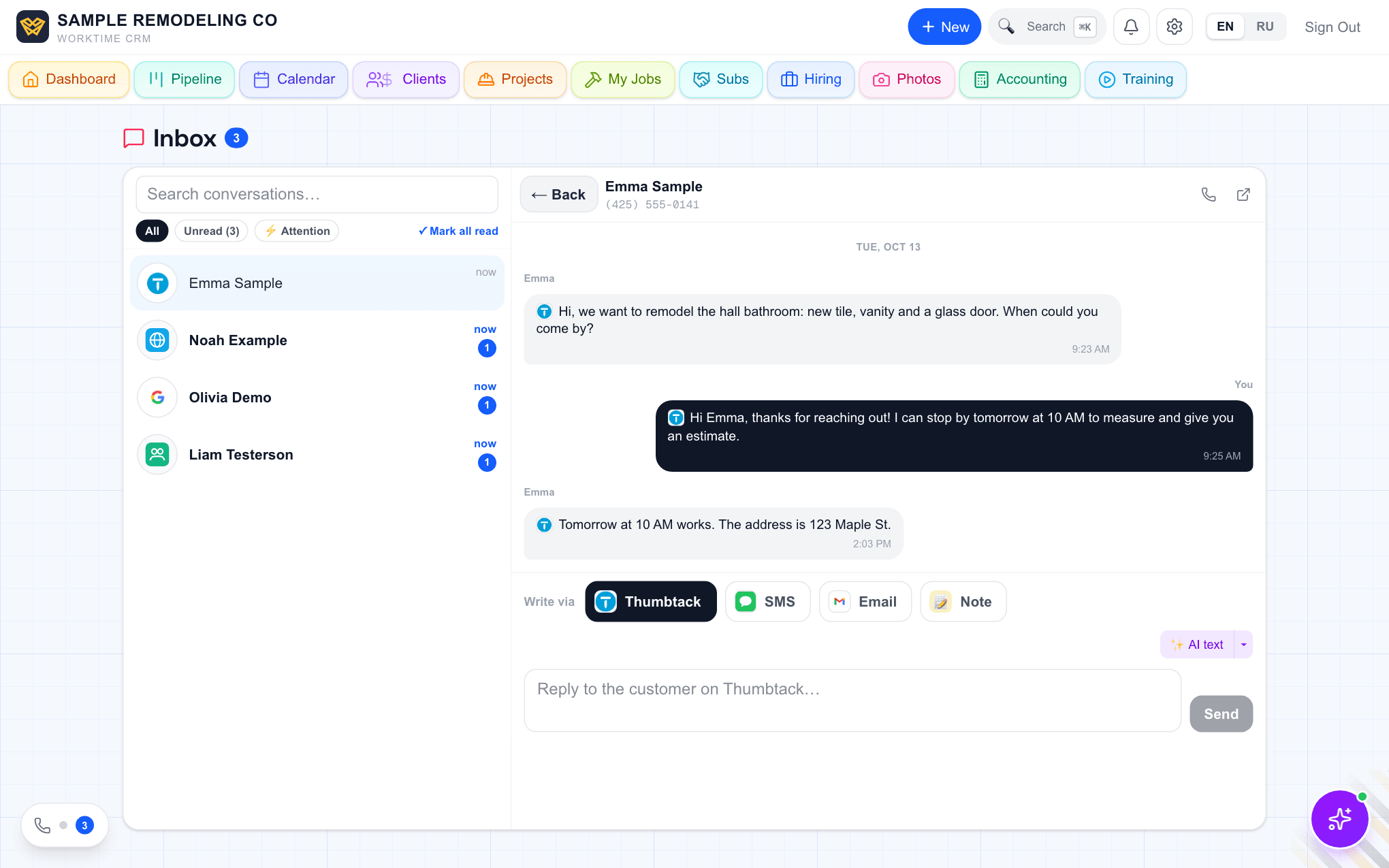
Every conversation lives behind the round phone button in the bottom-left corner of any page, in the Messages tab; the same list opens as a page at Inbox. One row per client, newest activity first, with the logo of where the lead came from. A bold name and a blue number mean something is unread. A small ⚡ means the client is waiting on your move, for example an estimate opened but not signed or a lead nobody has written to for two days; the Attention filter lists only them.
Open a row and the whole history is there in order: texts both ways, the Thumbtack chat, letters and calls. Under the chat sits "Write via": Thumbtack, SMS or Email, so you answer on the channel the client used without opening another app. "✨ AI text" writes a draft from this client's history; you edit and send.
Letters count like texts once your mailbox is connected in Settings → Connections → Email: the mailbox is checked every 10 minutes, and a client who answers by email rises in the list, lights the unread badge and rings the bell, the phone push and Telegram, with a link to the conversation. Every alert is filed under the bell at Notifications; the phone and Telegram alerts are set up in Settings → Connections → Telegram.
When both sides agree on a day and a time in a text, Thumbtack or email conversation, the CRM books the visit on the client's card and in the calendar by itself and tells you.
Questions
Where did the Inbox tab go?+
Conversations now open from the round phone button in the bottom-left corner of every page, in the Messages tab. The old Inbox address still works and shows the same list and chat as a page.
Does the client see that I use a CRM?+
No. A text arrives as a text, a Thumbtack reply shows up in their Thumbtack chat, and a letter comes from your own address once Gmail is connected.
What does it cost?+
Conversations, the bell and the phone alerts are part of the WorkTime CRM plan: 7 days free, no card needed, then $99 a month per company. Texts go through your own Twilio account, billed by Twilio.
💬 Discuss this article
Comments, likes and Ivan's answers live on the original page.
Open the comments →Work Time CRM
Every lead gets an answer: AI on the phone, estimates from a photo, payments and the whole job in one app.
Read next
Original on app.worktimealliance.com/guides/one-conversation-per-client